Picking a game engine should be a simple technical call. Instead, it turns into weeks of back-and-forth with no clear finish line.
Unreal Engine and Unity are both excellent, but they run on completely different philosophies. Unreal chases high-fidelity 3D by default. Unity chases flexibility across every kind of project.
Neither one wins the unreal engine vs unity question outright, and this isn’t a tutorial for either engine. What decides it is your project type, your team, and where the game needs to run. Work through each piece below, and the right engine gets obvious fast.
What Actually Separates These Two Engines at a Structural Level
Unreal Engine is built to produce high-end 3D output by default. Unity is built to produce whatever you need it to.
That’s not a small distinction. It shapes every choice you make the moment you open a new project.
How Unreal’s Architecture Is Built
Unreal’s architecture points at one output: dense, large-scale 3D environments. C++ sits at the core of the engine.
The rendering pipeline, the world-building tools, and the physics systems are all tuned for that use case first. If your project fits that mold, the engine works with you.
If it doesn’t, you’re stuck fighting systems that were never built with your goals in mind. I’ve watched developers wrestle with Unreal for months on a 2D project when Unity would have taken a weekend.
How Unity’s Architecture Is Built
Unity took a different approach. It’s built around a neutral component system.
GameObjects with attached scripts don’t care what you’re making. A 2D platformer, a mobile puzzle game, a VR experience, a 3D shooter: it’s all the same to the engine.
Nothing in the engine leans toward any one of those. They all start from the same place.
That neutrality is exactly why Unity needs more manual work to hit high visual quality. This is the part people usually get backwards.
Unity can absolutely get there. Stunning 3D visuals are just one output among many it supports.
They’re not the default it was built around. You have to set up the rendering pipeline, get the lighting right, and make real optimization calls.
With Unreal, much of that work is already done for you. So when people say Unreal looks better out of the box, they’re right.
But they’re describing a deliberate design choice, not a quality gap. Unity traded default visual output for flexibility.
Whether that trade works for you depends entirely on what you’re building.
How Each Engine’s Language Choice Shapes Your Development Experience
The programming language behind a game engine changes how you actually build games day to day. It shapes your workflow speed and how easily you can grow your project later.
1. Language and Developer Experience
The language behind an engine isn’t just a style choice. It decides how fast you can iterate and how much control you get over performance. It also decides how quickly a new developer gets productive.
Unity uses C#. Unreal uses C++, with Blueprints built on top of it.
2. C#: Speed and Accessibility
C# is a managed language. It handles memory for you, compiles fast, and reads clean.
For a solo developer or a small team, that matters more than it sounds. Faster compile times mean shorter feedback loops.
Cleaner syntax means less time stuck on strange errors. You can go from idea to working prototype without fighting the language the whole way.
3. C++: Power With Real Costs
C++ gives you direct control over memory and performance. That’s genuinely useful at scale, which is why large studios build on it.
But it comes with real costs. Full C++ rebuilds in Unreal can take several minutes, even on strong hardware, versus seconds in Unity.
The language demands more experience to write safely. I’ve seen mistakes that C# would catch on its own cause real damage in a C++ project.
That’s the gap between losing an afternoon and losing a week.
4. Blueprints: A Real On-Ramp, With a Ceiling
Blueprints change this math. Unreal’s visual scripting system is fully built in, not a bolted-on extra.
You can build complete gameplay logic without writing a single line of C++. For designers and beginners, that’s a real on-ramp.
The ceiling is real, though. Performance-heavy systems, complex AI, large-scale physics, and custom engine behavior all eventually need C++.
That’s what trips people up: Blueprints get you there, but they don’t keep you there.
5. The Practical Takeaway
With Unity, C# handles almost everything most projects need. You’re rarely pushed out of it.
If you’re early in your development career, that gap in day-to-day friction is worth taking seriously. It adds up over months of work.
If you’ve ever fought a compiler for an hour over a memory bug, you already know the answer. You know which side of that trade you’d pick.
Which Engine is Easier to Learn
For most people starting out, Unity has a shorter runway to a working game. C# reads clean, compiles fast, and has more beginner tutorials than any other engine language.
You can download Unity, follow a free course, and have something playable in a weekend. That’s not marketing.
It’s just how the language and editor are built. Unreal’s editor is bigger and more feature-dense.
That’s useful once you know what you’re looking at. Early on, it mostly means more ways to get stuck.
I’ve seen beginners lose an entire weekend just hunting for the right panel. Blueprints help.
You can build working gameplay without touching C++. But the editor still expects a baseline of familiarity Unity doesn’t ask for.
Here’s the honest take: if you’re learning game development for the first time, Unity’s curve is genuinely more forgiving. If you’re joining a studio built on Unreal, or you already code, that gap closes fast.
Graphics, Performance, and Hardware: What It Costs You
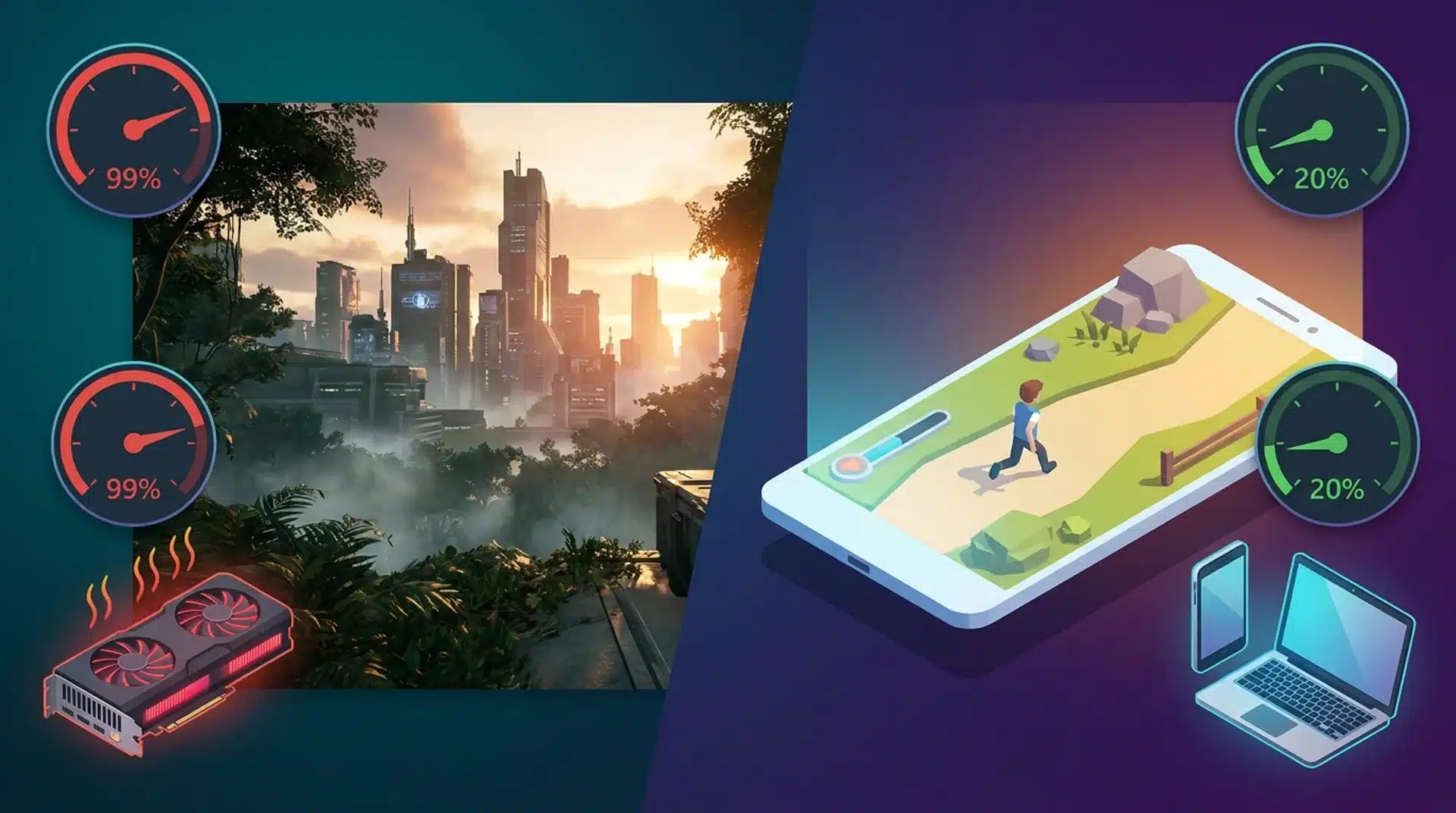
Unreal looks better than Unity the moment you open a new project. That’s true, and the reason behind it has real consequences for where your game can actually run.
What Nanite and Lumen Actually Require to Run
Nanite and Lumen are the two systems driving Unreal’s visual lead. Nanite handles geometry. It lets you use film-quality meshes without managing polygon counts by hand.
Lumen handles lighting. It builds real-time global illumination without pre-baking light into the scene.
Both are impressive systems. Both also demand a capable GPU to run well.
Lumen especially is expensive to run. On lower-end hardware, it either runs poorly or gets switched off entirely.
On mobile, where a huge share of indie games actually ship, neither system exists at all.
Here’s the part worth remembering: Unreal’s default visual edge doesn’t reach your players if their device can’t run it. I’ve watched teams build a gorgeous Lumen showcase, then find out half their audience can’t run it.
Unity’s Render Pipelines and When the Optimization Work Is Worth It
Unity doesn’t hand you a single default renderer. You choose between two pipelines, and that choice shapes everything you build after.
URP: Built for Reach
URP, the Universal Render Pipeline, is built for performance across a wide range of devices. It suits mobile, VR, and cross-platform targets well.
Unity’s DOTS, the Data-Oriented Technology Stack, is worth knowing about too. It’s a separate architecture from the standard GameObject model, and it matters most for:
- Large-scale simulations
- High object counts, like hundreds of enemies on screen
- Procedural environments
- Physics-heavy mobile games
Most projects don’t need DOTS on day one. But it’s the reason Unity can handle performance demands its lightweight reputation suggests it can’t.
HDRP: Matching Unreal, at a Cost
HDRP, the High Definition Render Pipeline, is built for visual quality on high-end hardware. It can match Unreal’s default output, but only with real work behind it.
That work isn’t abstract. Getting there means:
- Manually setting up your lighting instead of getting it for free
- Managing level-of-detail settings so distant objects don’t tank your frame rate
- Tuning shader complexity scene by scene instead of trusting a default
That’s the trade-off people underestimate. I’ve watched teams budget a week for HDRP lighting and spend a month on it.
HDRP gets you Unreal-level visuals, but only after you do the job Unreal’s renderer does for you automatically.
The honest version of this comparison is simple. If your game ships on a high-end PC or console, Unreal’s default pipeline saves you real work.
If you’re targeting mobile, web, or mixed devices, Unity’s setup is the better starting point. It isn’t a compromise.
Pricing Models: What You Actually Pay and When
Both engines are free to start. Where they differ is what happens as your project grows, and in Unity’s case, what happens when the terms shift without warning.
What Each Engine Costs Right Now
Both engines publish clear thresholds today, but those thresholds shape very different growth plans. Here’s where each one currently stands:
- Unreal Engine is free until your game earns $1 million in lifetime gross revenue. A 5% royalty applies only to earnings above that line.
- Unity is free for individuals and small teams earning under $100,000 a year. Per-seat subscription tiers apply once you cross that ceiling.
For most indie developers, neither engine costs a thing. The thresholds are generous, and most projects never get close to them.
Why Unity’s Pricing History Is Worth Watching
Where it gets messy is Unity’s recent history. In 2023, Unity announced a Runtime Fee: a per-install charge that would have applied to games already on the market.
The backlash was fast and severe. Unity reversed course, dropped the fee, and went back to seat-based pricing.
The fee itself is gone. What it showed about Unity isn’t.
Developers on long-horizon projects watched Unity change the financial terms of a deal they’d already committed to. Choosing an engine means building around it, hiring for it, and training your team on it.
Repricing mid-project carries real risk, no matter how fair the new terms turn out to be. I still hear developers bring up the Runtime Fee unprompted, two years later, whenever Unity pricing comes up.
Unity’s current pricing is fair. The real question isn’t whether today’s numbers work.
It’s whether you trust the track record enough to build a multi-year project on top of it.
Unreal has never made a comparable move. That consistency has real value, even if no feature table captures it.
Note: Verify Unity’s current subscription tier thresholds before publishing. These have changed before and could change again.
Which Engine Fits Your Situation: The Conditions that Change the Answer
Neither engine is the better choice in the abstract. The right one depends on three things: what you’re building, who’s building it, and where it needs to run.
Two more conditions belong in that mix before you get to the table below.
If you’re building a 2D game, Unity’s edge is concrete, not just reputation. It ships dedicated Tilemap and Sprite Editor tools built specifically for 2D work.
Unreal has Paper 2D, but it’s a largely neglected corner of the engine. I wouldn’t build a 2D game in Unreal today. The tooling just isn’t there.
If multiplayer is core to your game from day one, Unreal has the edge instead. It includes a built-in, battle-tested networking setup out of the box.
Unity leans on modular third-party packages to get the same result. That’s not a dealbreaker, but it’s more assembly work up front.
Work through all five conditions honestly, and the answer usually becomes clear.
| Condition | Choose Unreal | Choose Unity |
|---|---|---|
| Project type | High-fidelity 3D, open-world, AAA-scope | 2D, mobile, VR, rapid prototyping |
| Target platform | High-end PC or console | Mobile, web, mixed-device, cross-platform |
| Team experience | C++ experience available or hireable | Beginner to intermediate, C# comfortable |
| Team size | Mid-to-large teams with specialized roles | Solo developers or small teams |
| Visual priority | Realism is core to the product | Flexibility and performance matter more |
| Iteration speed | A longer setup phase is acceptable | Fast feedback loops are essential |
| Built-in tooling | Need advanced networking, VFX, and world tools | Need modularity and a large asset store with ready-to-use components |
No single row decides it on its own. The pattern across rows does.
If most of your answers land in one column, that’s your engine. If they split evenly, weight the platform row most heavily. It’s the one condition that can override everything else.
Unreal’s visual pipeline doesn’t reach players on devices that can’t run it. That matters more than any feature comparison.
Conclusion
Unreal and Unity are both serious tools, just serious about different things. Unreal chases high-fidelity 3D by default, while Unity chases flexibility across platforms and project types.
Add in the language ecosystems, the hardware demands, and the pricing histories. The picture gets clearer than you expect.
The real unreal engine vs unity question was never which engine is objectively stronger. It’s which one fits your project, your team, and your target platform.
That answer gets obvious once you work through the conditions honestly, rather than ranking two engines against a generic feature list.
Go back through the table above with your own project in mind. The right engine for you is already in there.
Frequently Asked Questions
Is Unity better than Unreal Engine?
Neither one wins outright. Unreal leads on high-fidelity 3D and built-in multiplayer. Unity leads on 2D, mobile, and fast prototyping. The better engine for you depends on your project type, your target platform, and how much C++ experience your team already has.
Can Unity make AAA games?
Yes, but not by default. Several commercial AAA-scope games have shipped on Unity, using HDRP set up and tuned by hand. That setup work is real and ongoing. If your team has the technical depth for it, you can get there. For most, Unreal reaches similar quality with less manual work.
Is Unreal easier to learn than Unity?
For most beginners, no. Unity’s C# compiles faster and reads more simply, and its editor asks less of you upfront. Unreal’s Blueprints lower the barrier for gameplay logic, but its editor and C++ still expect more baseline familiarity than Unity does.
What is the Unity controversy?
In 2023, Unity announced a per-install Runtime Fee that would have applied to games already shipped. Backlash was immediate, and Unity reversed the fee, returning to seat-based pricing. Terms are stable now, but the episode is a reminder that engine pricing can shift mid-project.